

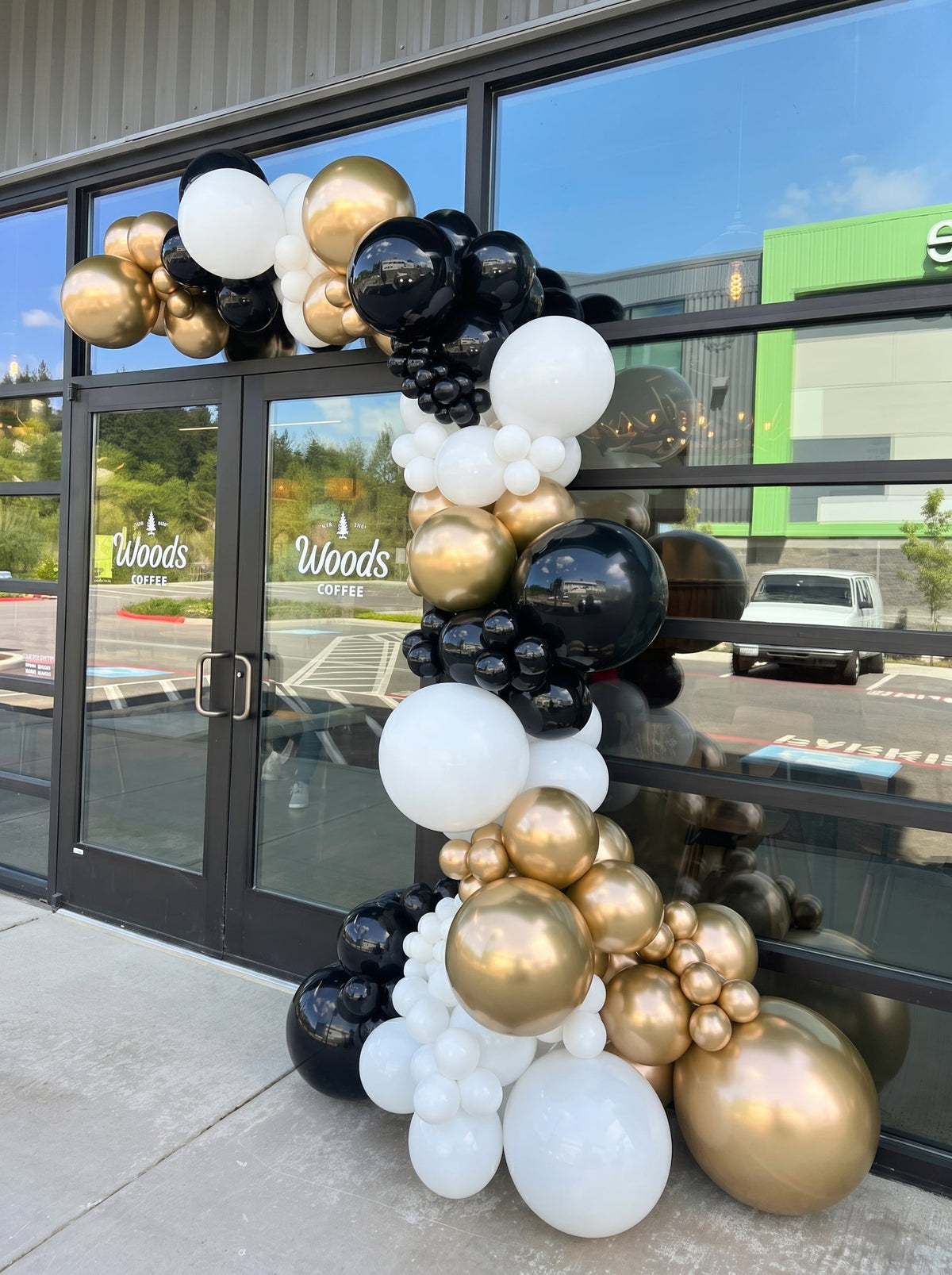
Before agreeing an entrance balloon layout, identify the signs and information people need to see, then review the proposed display against labelled photographs from the relevant approaches. Record what remains visible, what appears obscured and what cannot be judged from the images. Give each unresolved point a business, brand or property contact who can decide it.
This guide helps a Dubai business review a proposed entrance composition after choosing its display format. The columns versus entrance garland guide covers that earlier choice. Here, the task is a sign-by-sign visual check, not another format comparison or a landlord approval request.
Make a sign inventory before marking the balloons
Label the existing features you want the proposal to respect: S1 for the business name, S2 for an opening-hours notice, S3 for appointment or entrance information, for example. These are illustrative labels; use the signs actually present at your premises.
Ask the responsible business or property contact which features must remain visible and whether any other instructions apply. This article does not establish legal signage rules, a minimum clearance or an approval for your particular entrance.
Keep temporary event wording separate from permanent information. If a new opening message is proposed, identify whether it is a requested additional item and who will approve it. Do not let a balloon reference image silently replace the business sign or the actual information on the door.
Index the views people will use
Take a straightforward overview of the entrance and any other approach view relevant to the business. Label them V1, V2 and V3 as needed. Explain where each view was taken from, without inventing a standard viewing distance or angle.
Show the existing signs in the photographs and mark their S labels. Add the proposed display outline on a copy or marked drawing, clearly labelled as a proposal. Keep an unmarked original so everyone can distinguish the current entrance from the imagined arrangement.
If the supplier provides a proposed layout, connect it to the same view references. A design shown only straight on may leave a question about another approach. Mark that as “not assessed from this view” rather than assuming the sign will be visible everywhere.
Use a sign-visibility review sheet
| Feature | View checked | Observation or question | Decision owner |
|---|---|---|---|
| Business name | Record the relevant V references. | Visible, apparently obscured, or cannot tell; explain the point. | Business or brand contact. |
| Opening information | Record the relevant V references. | Can the existing notice be identified in the proposal? | Business contact. |
| Entrance information | Record the relevant V references. | Identify any instruction or sign needing further discussion. | Business or property contact. |
| Requested new wording | Connect it to the proposed layout version. | What text, item and position are actually being requested? | Named wording approver and supplier. |
| Revised proposal | New plan and view references. | Which earlier concern does the change address? | Organiser, with the relevant decision-maker. |
| After setup | Record the actual view checked. | Does it match the agreed proposal, and what remains open? | Receiving business contact. |
Review a proposed adjustment without inventing dimensions
Imagine a fictional proposal where balloons appear to cover part of the opening-hours notice in V1, while the business name remains visible. Record that specific observation and ask the supplier and business contact to discuss a revision. Do not prescribe an attachment method, exact gap or technical solution from this example.
When a revised layout arrives, check the same sign and view again, as well as any other feature affected by the move. Keep the new version with the actual decision. “Please keep the hours visible” is a request; a reviewed proposal and the later site check are separate records.
A photograph can help people discuss the composition, but it cannot guarantee readability from every position or establish a complete property assessment. Ask the responsible contact to resolve anything that needs checking at the site.
Keep product scope separate from the visual review
The Entrance Balloon Garland listing includes the garland, installation, delivery and setup. It describes customising the size, colours and styling. Keep those inclusions tied to this listing; they do not establish the dimensions or final layout for your entrance.
If the visual review produces a request for a separate sign, different wording or another item, ask the team to identify that requested change in the proposal. Do not assume an installation inclusion covers every new branding element.
Please review entrance proposal [version] against views [references]. Existing signs are labelled [S references]. Our main concern is [specific sign and view]. The responsible contact is [name]. Please identify the revised arrangement you can propose and any scope question. We will keep the sign review, property answers and final quoted items together.
Share your annotated entrance views with Lunar Moments. Agree the site proposal and full quoted scope, with actual date and booking arrangements confirmed separately.
Entrance sign-visibility questions
Does a front-facing photograph establish visibility from every approach?
No. Label the views relevant to your entrance and record which features were checked in each. Leave other views as unassessed until the appropriate contact can review them.
Does this guide specify a required gap around signs?
No. It supplies a visual review record, not technical dimensions or legal signage rules. Ask the supplier and responsible property or business contact about the actual proposal.
Are new signs or wording automatically included with garland installation?
Do not assume they are. The listing’s installation, delivery and setup inclusions do not establish every additional branding item. Identify new requests and have their scope confirmed.


